> ## Documentation Index
> Fetch the complete documentation index at: https://docs.brainstormer.io/llms.txt
> Use this file to discover all available pages before exploring further.
# Brand & Appearance
> Customize how your agent looks and how the pre-chat variable form behaves.
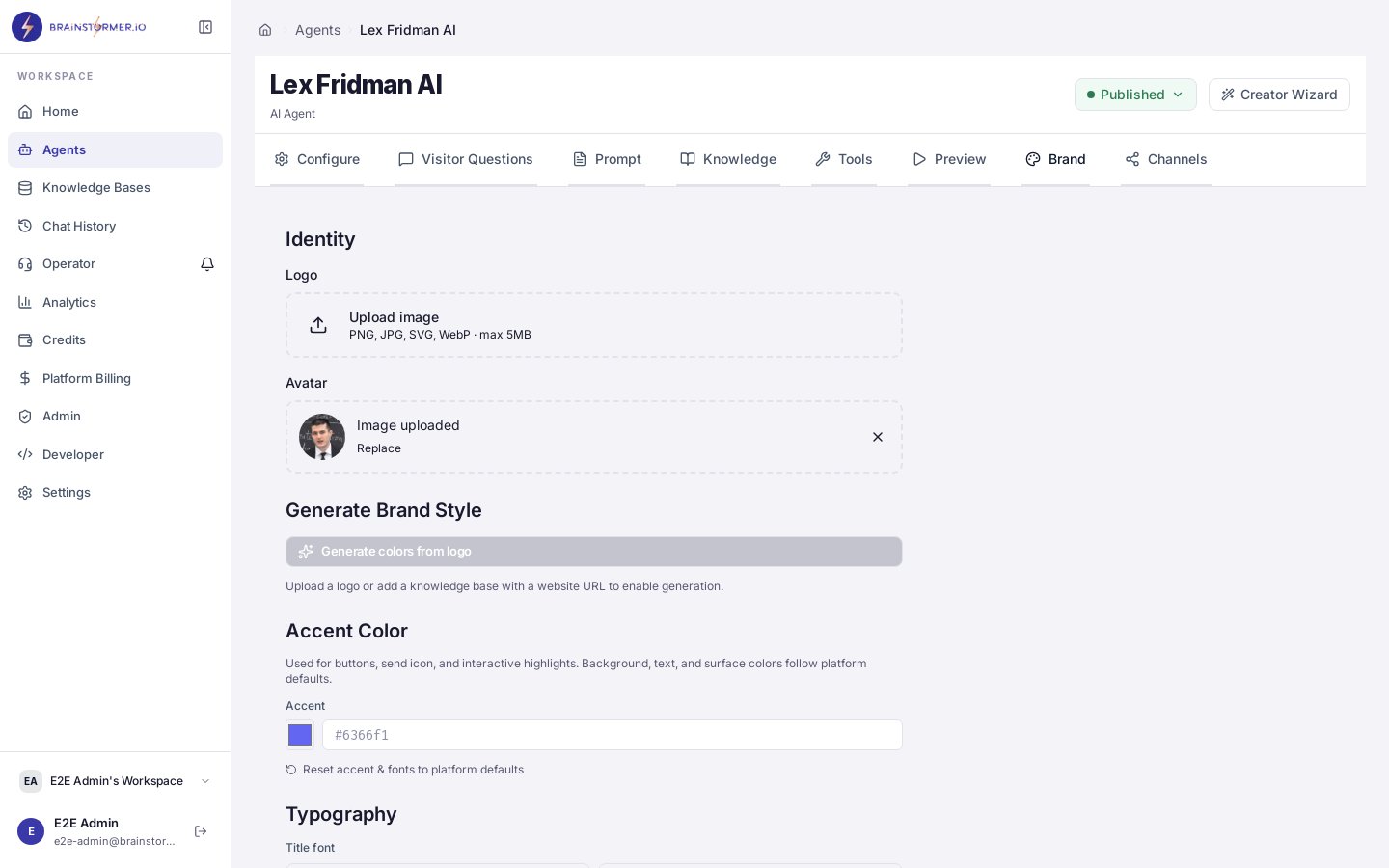
The **Brand** tab on the agent editor controls every visible aspect of the chat surface your end users see — branding, chat styling, and the optional pre-chat variable form. Settings persist on each agent as `widget_config`, with your organization's `widget_defaults` acting as the fallback.
 ## Editor Layout
The editor is organized into eight tabs with a persistent header action bar (**Save**, **Preview**, **Publish**):
1. **Configure** — name, description, model, temperature, and voice settings
2. **Visitor Questions** — suggested starter questions shown to end users
3. **Prompt** — system prompt + template variables
4. **Knowledge** — linked knowledge bases
5. **Tools** — agent capabilities and behaviors
6. **Preview** — test the agent inside the editor
7. **Brand** — this page
8. **Channels** — public page, sharing, and distribution channels
## Brand Sections
### Branding
Controls the visual identity of the chat surface.
* **Agent avatar** — displayed in the chat header and next to each assistant message
* **Header title / subtitle** — override the default (agent name) shown above the chat
* **Primary color** — drives button fills, link colors, and the assistant bubble accent
* **Background** — chat canvas color or subtle gradient
* **Logo** — optional small logo at the bottom-left of the chat
### Chat
Controls the chat surface behavior.
* **Welcome message** — shown as the first assistant message when a new conversation starts. Supports `{{variable}}` placeholders and can run in **fixed** (static) or **generated** (LLM) mode.
* **Placeholder text** — input field hint
* **Send button style** — icon only, text only, or both
* **Show "Powered by Brainstormer"** — toggle the footer attribution
### Variable Form
Enable a pre-chat form that collects information from the user before the conversation begins. Useful for personalization or required context.
* **Enable variable form** — master toggle
* **Form fields** — any `{{variable}}` referenced in your prompt or welcome message that is marked `required` will render here automatically
* **Submit button label** — defaults to "Start chat"
* **Skip when continuing** — if the user returns to an existing conversation, the form is skipped and stored variables are re-used
Variables collected via the form flow through the same five-source precedence chain documented in [Prompt Configuration](/platform-guide/agents/prompt-configuration#variables).
## Organization Defaults
Superadmins can set org-wide defaults from **Settings → Brand Defaults**. These act as the fallback for any field an agent doesn't override, so a consistent brand feel propagates to every new agent without per-agent setup.
## Editor Layout
The editor is organized into eight tabs with a persistent header action bar (**Save**, **Preview**, **Publish**):
1. **Configure** — name, description, model, temperature, and voice settings
2. **Visitor Questions** — suggested starter questions shown to end users
3. **Prompt** — system prompt + template variables
4. **Knowledge** — linked knowledge bases
5. **Tools** — agent capabilities and behaviors
6. **Preview** — test the agent inside the editor
7. **Brand** — this page
8. **Channels** — public page, sharing, and distribution channels
## Brand Sections
### Branding
Controls the visual identity of the chat surface.
* **Agent avatar** — displayed in the chat header and next to each assistant message
* **Header title / subtitle** — override the default (agent name) shown above the chat
* **Primary color** — drives button fills, link colors, and the assistant bubble accent
* **Background** — chat canvas color or subtle gradient
* **Logo** — optional small logo at the bottom-left of the chat
### Chat
Controls the chat surface behavior.
* **Welcome message** — shown as the first assistant message when a new conversation starts. Supports `{{variable}}` placeholders and can run in **fixed** (static) or **generated** (LLM) mode.
* **Placeholder text** — input field hint
* **Send button style** — icon only, text only, or both
* **Show "Powered by Brainstormer"** — toggle the footer attribution
### Variable Form
Enable a pre-chat form that collects information from the user before the conversation begins. Useful for personalization or required context.
* **Enable variable form** — master toggle
* **Form fields** — any `{{variable}}` referenced in your prompt or welcome message that is marked `required` will render here automatically
* **Submit button label** — defaults to "Start chat"
* **Skip when continuing** — if the user returns to an existing conversation, the form is skipped and stored variables are re-used
Variables collected via the form flow through the same five-source precedence chain documented in [Prompt Configuration](/platform-guide/agents/prompt-configuration#variables).
## Organization Defaults
Superadmins can set org-wide defaults from **Settings → Brand Defaults**. These act as the fallback for any field an agent doesn't override, so a consistent brand feel propagates to every new agent without per-agent setup.
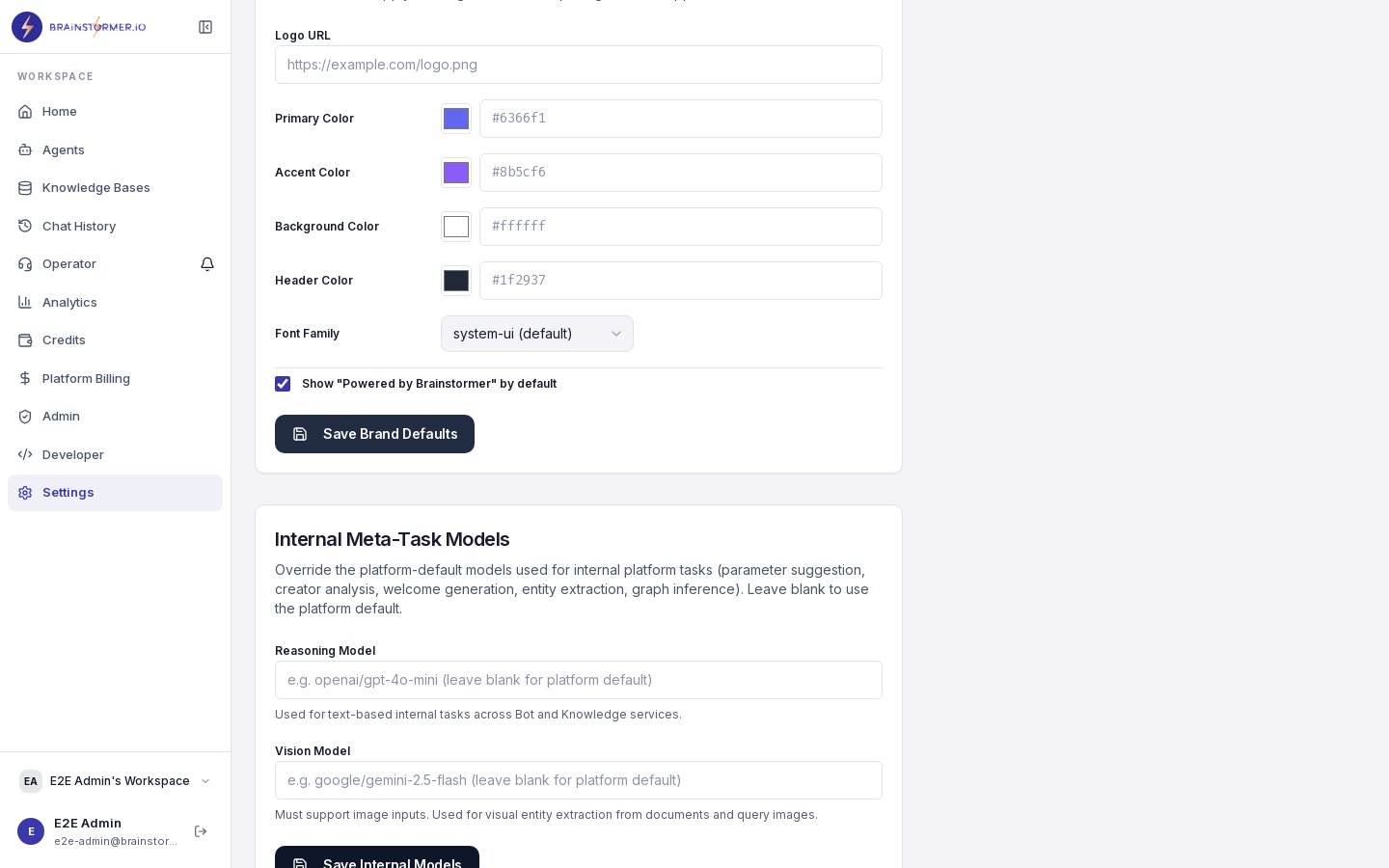 The effective config an end user sees is `widget_defaults` (org) merged with `widget_config` (agent) — agent-level values win where both are set.
## Previewing
Use the **Preview** action in the editor header to open the chat page in a new tab against your current (unsaved or saved) config. Unpublished agents show a **Draft Preview** banner to make clear the view isn't public.
## Publishing
Appearance changes are part of the agent config and ship when you **Publish**. Drafts do not affect the live public URL (`/a/:slug`) until published.
## See Also
* [Creator Wizard](/platform-guide/agents/creator-wizard) — initial setup flow with intent-driven defaults
* [Publishing an Agent](/platform-guide/agents/publishing)
* [Prompt Configuration](/platform-guide/agents/prompt-configuration)
The effective config an end user sees is `widget_defaults` (org) merged with `widget_config` (agent) — agent-level values win where both are set.
## Previewing
Use the **Preview** action in the editor header to open the chat page in a new tab against your current (unsaved or saved) config. Unpublished agents show a **Draft Preview** banner to make clear the view isn't public.
## Publishing
Appearance changes are part of the agent config and ship when you **Publish**. Drafts do not affect the live public URL (`/a/:slug`) until published.
## See Also
* [Creator Wizard](/platform-guide/agents/creator-wizard) — initial setup flow with intent-driven defaults
* [Publishing an Agent](/platform-guide/agents/publishing)
* [Prompt Configuration](/platform-guide/agents/prompt-configuration)